|
|
General
- Left Mouse Button: Move, Attack, Lean, or Sit-down options
- Right Mouse Button: Use spells or skills
- [Ctrl] + Mouse Button: PK Attack
- F1: Help Menu
- F2: Dialogue Toggle
- F3: Whisper mode On/Off
- F4: Adjust Chat Window
- F5: Toggles MUssenger chatting window when receiving incoming message
- F6: Hides MUssenger chatting window
- Enter: Opens Text Box
- Shift: Holds Character position
- Spacebar: Picks up Item/Zen
- Print Screen: Takes Screen Shot
- ALT: Displays Item name on ground
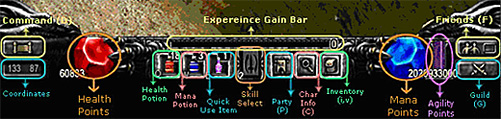
- C: Character Stats
- I/V: Inventory
- M: Warp Menu
- D: Command List
- Q: Uses default health item
- W: Uses default mana potion
- E: Uses item that is put into Shortcut
- F: Opens/Closes MUssenger
- P: Party Window
- G: Guild Window
- Numbers (1-9): Select Spell/Skill Binds
- CTRL + number (1-9): Bind spells/skill to number
Command List
This is a window that is brought up by pressing "D" on the keyboard. It is an alternate way of using commands without typing /. Just left click on command choice then right click on the player you wish to use it on.
- /Party: To set up a party
- /Guild: To join a guild
- /Trade: To start a trade
- /Request : Declines or accepts any request
- /Buy: Opens personal store
- /Duel: Begins/Ends a duel with opposing player
Interface
|
|
|